Notes - Configuration With Viper

Viper

Viper is a complete configuration solution for Go applications from spf13.

Precedence Order

Viper uses the following precedence order. Each item takes precedence over the item below it:

Notes - PostgreSQL

Installation

  • Download the installer from PostgreSQL Download Page
  • Install the server, pgAdmin and command line tools, but not Stack Builder(Drivers and add-ons for other language)
  • You can install multiple database server in the same computer as long as their port is different

For Windows

  • Data Directory: C:\Program Files\PostgreSQL\13\data
  • Superuser: postgres / my-password
  • Locale: [Default locale]

For Linux

// check version
lsb_release -a
sudo apt update
// version 12 in Ubuntu 20
sudo apt install postgresql

sudo -u postgres createuser --interactive

sudo -i -u postgres
createdb dbname

psql
\? // list all psql commands
\h // list all the SQL commands
\conninfo
\l
\d
ALTER USER postgres PASSWORD 'root';
\q // quit

Verify

From the Start > PostgrSQL 13, you can open pgAdmin or SQL Shell to test the installation.

Notes Egnyte

Our system uploaded the exported Inventory All Fields file into Egnyte Plateform every day for each facility. I need to analyze this file to create two reports each week. (Each file is about 70M or more).

How To Copy Files Between Google Drive?

How to copy files between Google Drive?

  • Click the link to go to the shared Google Drive page in browser
  • Sign in to your Google Drive account
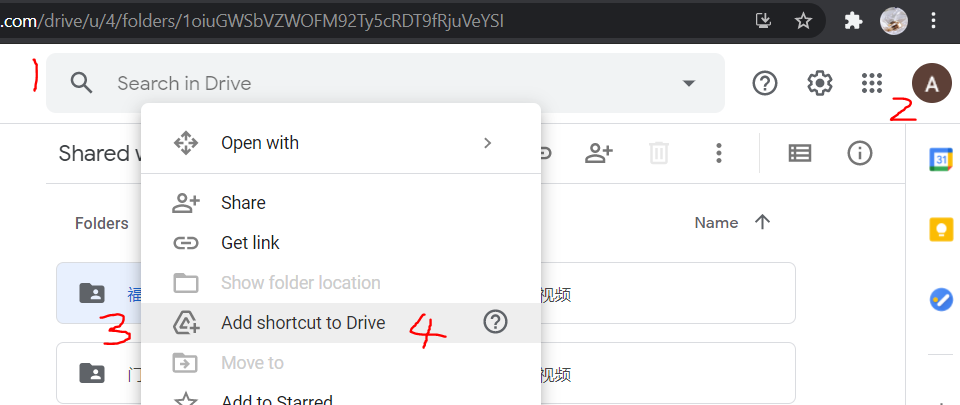
  • Right-click the shared folder and select Add Shortcut to Drive to add a shared folder shortcut to a specific folder(My Drive/XingFu) of your Drive. You can delete this afterwards.

Create Google Drive Shortcuts

Notes - Echo Web Framework

Echo Web Framework

How to get URL parameter and query parameter values?

// localhost/user/123?name=Andrew&age=12
e.GET("/user/:id", showInfo)

func showInfo(c echo.Context) error {
    // name, age are get from url parameters; 
    myname := c.QueryParam("name") // Andrew
    myage := c.QueryParam("age") // 12
    
    // id is get from url path
    myid := c.Param("id") // 123
	...
}	

Binding

Binding request data

In the struct definitions each field can be tagged to restrict binding to specific source.

Notes - IBM Carbon Components for Svelte

IBM Carbon Components - Svelte

DatePicker

<script>
  import { DatePicker, DatePickerInput } from "carbon-components-svelte";
</script>

<DatePicker datePickerType="single" dateFormat="m/d/Y">
  <DatePickerInput labelText="Schedule a meeting" placeholder="mm/dd/yyyy" />
</DatePicker>
  • When set datePickerType to single or range, the calendar will show out
  • dateFormat use only one character for day, month and year. e.g. March 15, 2021 - m/d/Y(03/15/2021) or Y-m-d(2021-03-15)

Reference

Notes HTML and CSS

Table

colspan & rowspan Examples

<table>
  <tr>
    <td>Row 1, Col 1</td>
    <td>Row 1, Col 2</td>
  </tr>
  <tr>
    <td colspan="2">Row 2, Col 1 & Col 2</td>
  </tr>
</table>
<table>
  <tr>
    <th>Row 1, Col 1</th>
    <th>Row 1, Col 2</th>
  </tr>
  <tr>
    <td>Row 2, Col 1</td>
    <td rowspan="2">Row 2 & Row 3, Col 2</td>
  </tr>
  <tr>
    <td>Row 3, Col 1</td>
  </tr>
</table>

Jump to a topic

If you want to link to a specific topic/section of a page, Add an id attribute and give a name to the section of the page.

Notes - SvelteJS

SvelteJS notes

Up and running

Get Start

See instruction for Svelte Template

npx degit sveltejs/template svelte-app
cd svelte-app
npm install

// dev mode
npm run dev
// -- create your app


// production mode
npm run build
npm run start
  • main.js
1
2
3
4
5
6
7
import App from './App.svelte';

const app = new App({
	target: document.body,
});

export default app;
  • App.svelte
1
<h1>Hello, World!</h1>

FAQ

How can I add an image to my svelte component?

  • For static files(images, videos, etc) must be under public folder. Use the path relative to public/index.html.
  • For Svelte component files, they should be under src folder.

For example, if you want to show image under public/static/flag.jpg and show button from src/Button.svelte: